

Nano Banana 2.1 vs GPT Image 2.5
We ran the same six prompts on Google's Nano Banana 2.1 and OpenAI's GPT Image 2.5 Flare, the version of GPT Image 2.5 this studio runs: a poster, a portrait, a product shot, a wide website banner, a scene built from three uploaded photos and a sticker on a transparent background. Flare kept closer to the exact wording and layout and is the only one with a real transparent background. The other three tests came out even, and Flare costs less at every resolution.
Production preview
Nano Banana 2.1 vs GPT Image 2.5 Flare, spec by spec
The top three rows are what we saw in the tests below; the rest are what each model offers in the studio. Credits are per image, and 1K, 2K and 4K are the output size settings, from smallest to largest. The 10 free credits a new account gets cover one GPT Image 2.5 Flare image at 1K, but not a Nano Banana 2.1 image.
| Nano Banana 2.1GoogleUse Nano Banana 2.1 | GPT Image 2.5 FlareOpenAIUse GPT Image 2.5 Flare | |
|---|---|---|
| Exact wording and layout | Spelled every word right, but added lines nobody asked for and filled the space meant for a button | Printed only the requested text and left the empty space where the prompt asked for it |
| Photos and uploaded references | Even: a misty, natural portrait and an evenly lit product shot; kept the face, mug and lighthouse from three uploads | Even: a warmer, closer portrait and a tighter product shot; kept the same details from three uploads |
| Transparent background | No setting; painted a checkerboard instead | Yes: choose Transparent under Background type |
| Credits per image | 20 at 1K, 25 at 2K, 35 at 4K | 6 at 1K, 10 at 2K, 16 at 4K |
| Highest resolution | 4K | 4K |
| Image shapes | Square, portrait and landscape up to 21:9, plus wide 4:1 and 8:1 strips and tall 1:4 and 1:8 ones | Square, portrait and landscape up to 21:9 |
| Images you can upload for an edit | Up to 14 | Up to 16 |
Nano Banana 2.1 vs GPT Image 2.5 on six real jobs
For every test we kept the first image each model returned at 1K, with no reruns. The banner is 21:9; the rest are square. Choose a test, then open either image full size.
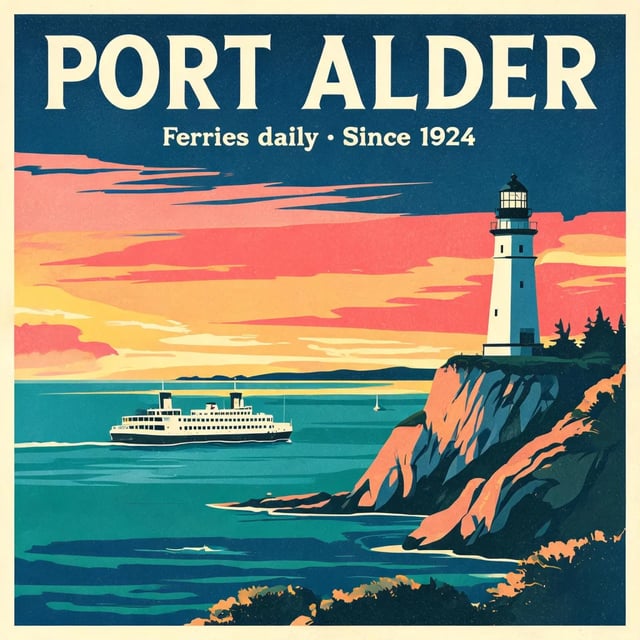
A vintage travel poster for a coastal town called "Port Alder". Big headline "PORT ALDER", a smaller line "Ferries daily · Since 1924", a lighthouse at sunset, flat screen-print style.
Both spelled the two lines correctly. Nano Banana 2.1 added a third line, The Pearl of the Coast, that the prompt never asked for, and it runs off the bottom edge. If your poster has fixed wording, check for extras.
Nano Banana 2.1
Google · 1KBoth lines right, plus an extra tagline cut off at the bottom.
GPT Image 2.5 Flare
OpenAI · 1KExactly the two lines asked for, over a sunset bay with a ferry.
A candid photo of an elderly fisherman mending a net on a wooden dock, early morning light, shallow depth of field, shot on a 50mm lens.
Both look like real photos. Nano Banana 2.1 read early morning light as soft mist and cool tones; GPT Image 2.5 Flare chose a warm sunrise and a closer crop. Pick by the mood you want.
Nano Banana 2.1
Google · 1KA quiet, misty dawn with the whole figure in frame.
GPT Image 2.5 Flare
OpenAI · 1KCloser and warmer, with the sun low behind the harbor.
Studio product photo of a matte ceramic coffee mug in sage green on a light oak table, soft window light from the left, plain white background, no logos.
Both made a clean sage green mug on light oak with no logo. Only GPT Image 2.5 Flare shows the window light coming from the left, as shadows on the wall. Nano Banana 2.1 lights the mug evenly and leaves more empty space, handy if you add text later.
Nano Banana 2.1
Google · 1KEven light and plenty of room around the mug.
GPT Image 2.5 Flare
OpenAI · 1KWindow light falls from the left, as the prompt asked.
A wide website hero banner for a bakery called "Crumb & Co.": a long wooden counter with fresh loaves and croissants, warm morning light. The name "CRUMB & CO." in large letters on the left, empty space on the right.
The prompt asked for empty space on the right, where a website button would go. GPT Image 2.5 Flare left it mostly empty. Nano Banana 2.1 filled it with bakers and pastries and added a second line of text.
Nano Banana 2.1
Google · 1K · 21:9Name spelled right, plus an extra line; the right side is full.
GPT Image 2.5 Flare
OpenAI · 1K · 21:9Name on the left and a mostly bare wall on the right, ready for a button.
Combine the three reference images: the fisherman from the photo sits on a bench in the harbour town from the poster, holding the sage green mug. Keep his face, the mug and the lighthouse recognisable. Natural photo, golden hour.
Both models got the same three uploads: Flare's fisherman, poster and mug from tests 1 to 3 above. Nano Banana 2.1 used them just as well. Both kept his beanie, beard and apron, the green mug and the white lighthouse with its red-roofed house, so this one is even.
Nano Banana 2.1
Google · 1K · 3 uploadsHe looks down at the mug beside the lobster traps, ferry behind.
GPT Image 2.5 Flare
OpenAI · 1K · 3 uploadsHe holds up the mug as the sun sets behind the town.
A die-cut sticker of a cheerful cartoon lemon wearing round sunglasses, thick white outline, isolated on a transparent background.
GPT Image 2.5 Flare, with Transparent chosen under Background type, returned a sticker with a real transparent background that sits on any color. Nano Banana 2.1 has no background setting and painted a grey checkerboard into the picture, which prints as a checkerboard.
Nano Banana 2.1
Google · 1KA fake checkerboard is part of the image.
GPT Image 2.5 Flare
OpenAI · 1K · TransparentA real transparent background, ready to drop onto any design.
Nano Banana 2.1 vs GPT Image 2.5: which one for which job
Pick GPT Image 2.5 Flare when the image has exact wording or a fixed layout: posters, banners with space for a button, and stickers or cut-outs that need a transparent background. It is also the cheaper choice when you want to try many ideas. Pick Nano Banana 2.1 when you need a very wide or very tall image, such as an 8:1 header strip or a 1:8 vertical banner, which Flare cannot make, or when you want to try Google's newest model on your own portraits and scenes. On photos of people, products and scenes built from your own uploads the two were close, so price and image shape usually decide.
Nano Banana 2.1 or GPT Image 2.5: questions before you pick
On these six jobs, no. GPT Image 2.5 Flare kept to the exact wording and layout on the poster and the banner, and it is the only one of the two with a real transparent background. The portrait, the product shot and the three-photo scene were even. The tests did not cover the very wide 8:1 and very tall 1:8 shapes, which only Nano Banana 2.1 makes.
Google says 2.1 improves image quality and realism, follows prompts more closely, keeps characters more consistent across edits and renders text and infographic layouts more accurately. Google also says it fixed seams that showed on very wide and very tall images at 2K and 4K. Nano Banana 2 is still in the studio at 8 credits per 1K image.
No. GPT Image 2.5 comes in two versions, Flare and Sunburst. The studio runs Flare, the version OpenAI positions for speed, and that is the version in these tests.
Flare is the one to try for free: a 1K Flare image costs 6 credits and a new account starts with 10. Nano Banana 2.1 starts at 20 credits per image, so it needs a credit pack or a plan; the older Nano Banana 2, at 8 credits for 1K, also fits in the free credits. On both models, 2K and 4K use paid credits. Free images carry a watermark.
Nano Banana 2.1. GPT Image 2.5 Flare stops at 21:9, while Nano Banana 2.1 also makes wide 4:1 and 8:1 strips and tall 1:4 and 1:8 banners. A 4K image costs 35 credits, so try the layout at 1K first; these shapes were not part of the six tests.
Yes. Upload one or more images and describe the change you want. Nano Banana 2.1 takes up to 14 images and GPT Image 2.5 Flare up to 16, enough to combine a person, a product and a background in one picture.
More AI image models, tested on the same prompts
The poster, portrait and product tests also ran on Nano Banana 2, Seedream 5 Lite and Grok Imagine, next to GPT Image 2.5 Flare.
Put Nano Banana 2.1 and GPT Image 2.5 on your own brief
Start with the kind of job that split them: a banner with space for a button, or a sticker you need on a transparent background. Run it on Flare, then on Nano Banana 2.1, and compare.