

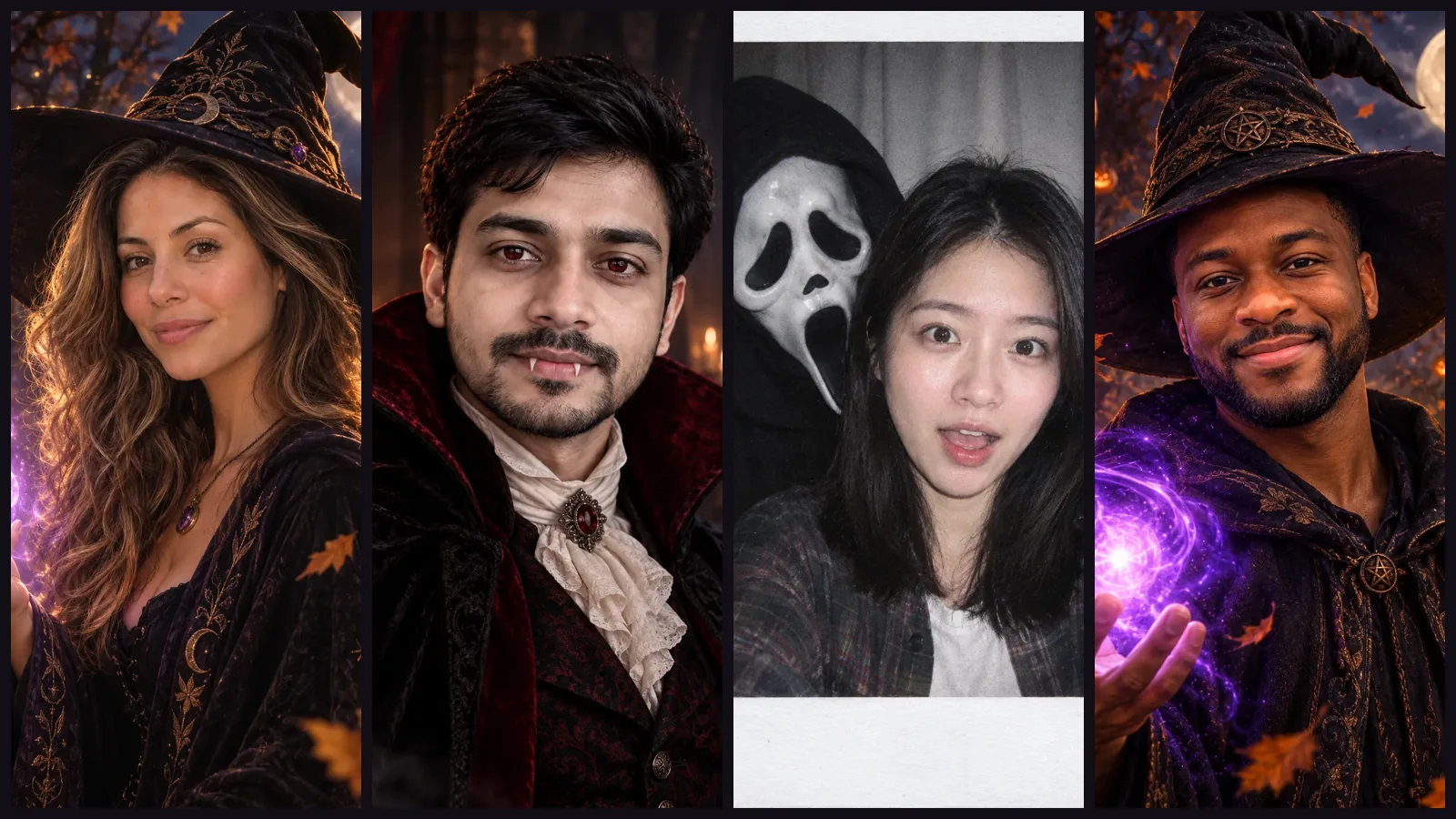
A good Halloween AI prompt does four things: it says what to turn you into, tells the AI to keep your face, describes the costume and the setting in concrete detail, and lists what to leave out. The 25 prompts below follow that pattern. Prompts 1 to 16 need a photo of you (or your partner, friends or pet). Prompts 17 to 25 need no photo at all. The example images come from prompts 1 to 3, which are the prompts behind this site's Halloween effects; the rest use the same structure, and results will vary from photo to photo.
Copy a prompt as it is, then change one thing at a time: the costume colour, the setting or the light.
How a Halloween AI photo prompt keeps your face
Most Halloween AI photos are made with image to image: you upload a selfie and the prompt describes the new look. The model redraws the outfit, the background and the light, and the photo tells it who you are. Whether the result still looks like you depends on your photo and, above all, on one sentence in the prompt.
Here is the full prompt behind the Halloween witch effect on this site, unchanged:
Turn the person in the photo into a magical witch for Halloween. Keep the person's face, facial features, skin tone, hairstyle and hair colour clearly recognisable as the same person in the photo. Wide-brimmed pointed hat, dark flowing robes with subtle embroidery, a softly glowing spell of purple light in one hand. Background of an autumn forest at night with a full moon, floating pumpkin lanterns and drifting leaves. Enchanting, warm and spooky, cinematic lighting. One subject only; no text unless asked for, no logos, no watermark, no extra people, no extra fingers or distorted hands.
It has five parts, in this order:
- The change: "Turn the person in the photo into a magical witch."
- The keep line: face, features, skin tone, hairstyle and hair colour stay the same. Name each one. "Keep my face" on its own can leave the model free to change your hair or skin.
- The costume: three or four visible details (hat, robes, a glowing spell) rather than a single word like "witch".
- The setting and light: where you are, what is around you, and how it is lit.
- The leave-outs: one subject, no text, no extra people, no distorted hands.
This is what that prompt produced from one plain selfie, running on GPT Image 2.5 Flare at a 3:4 portrait ratio:
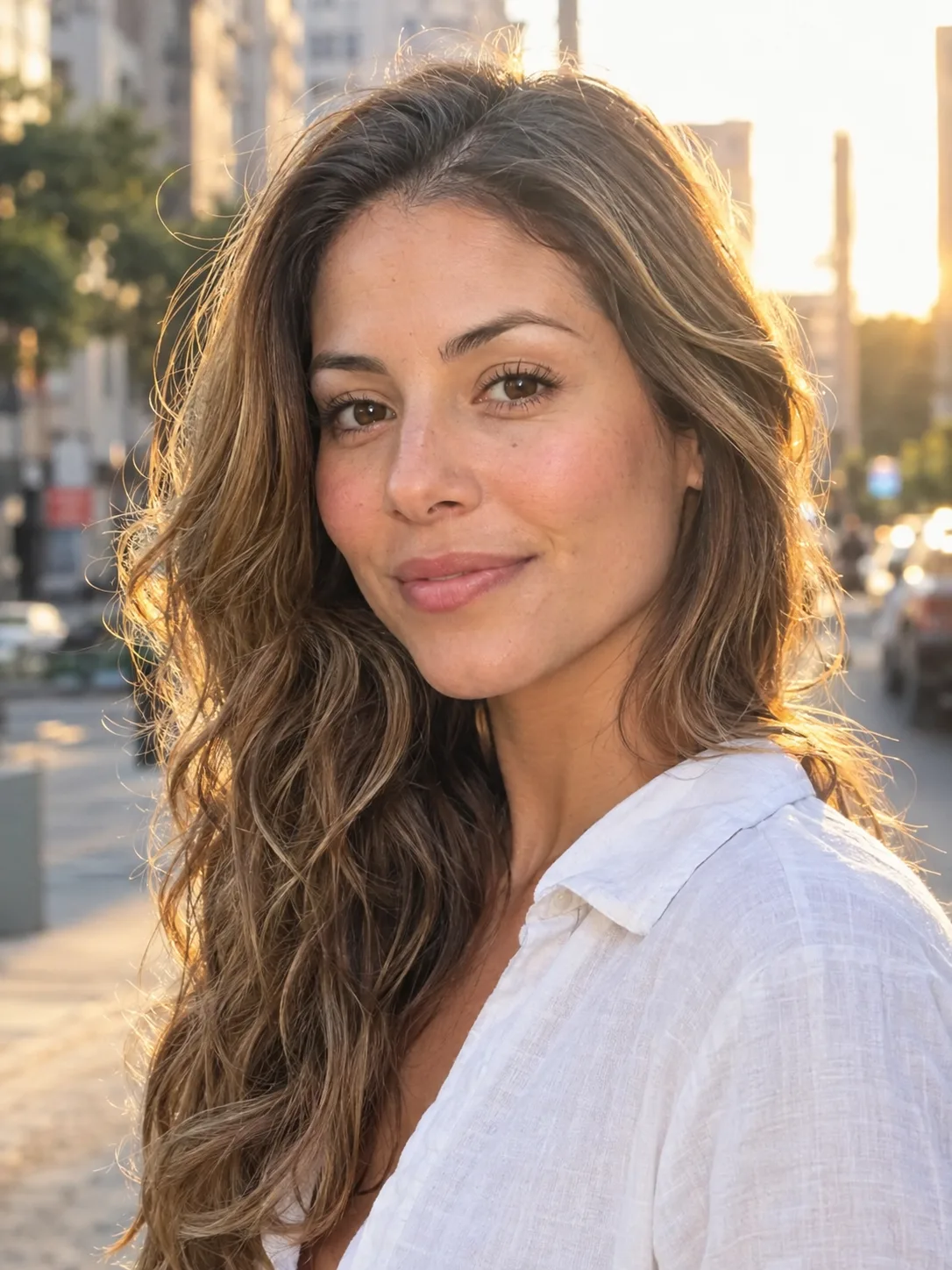
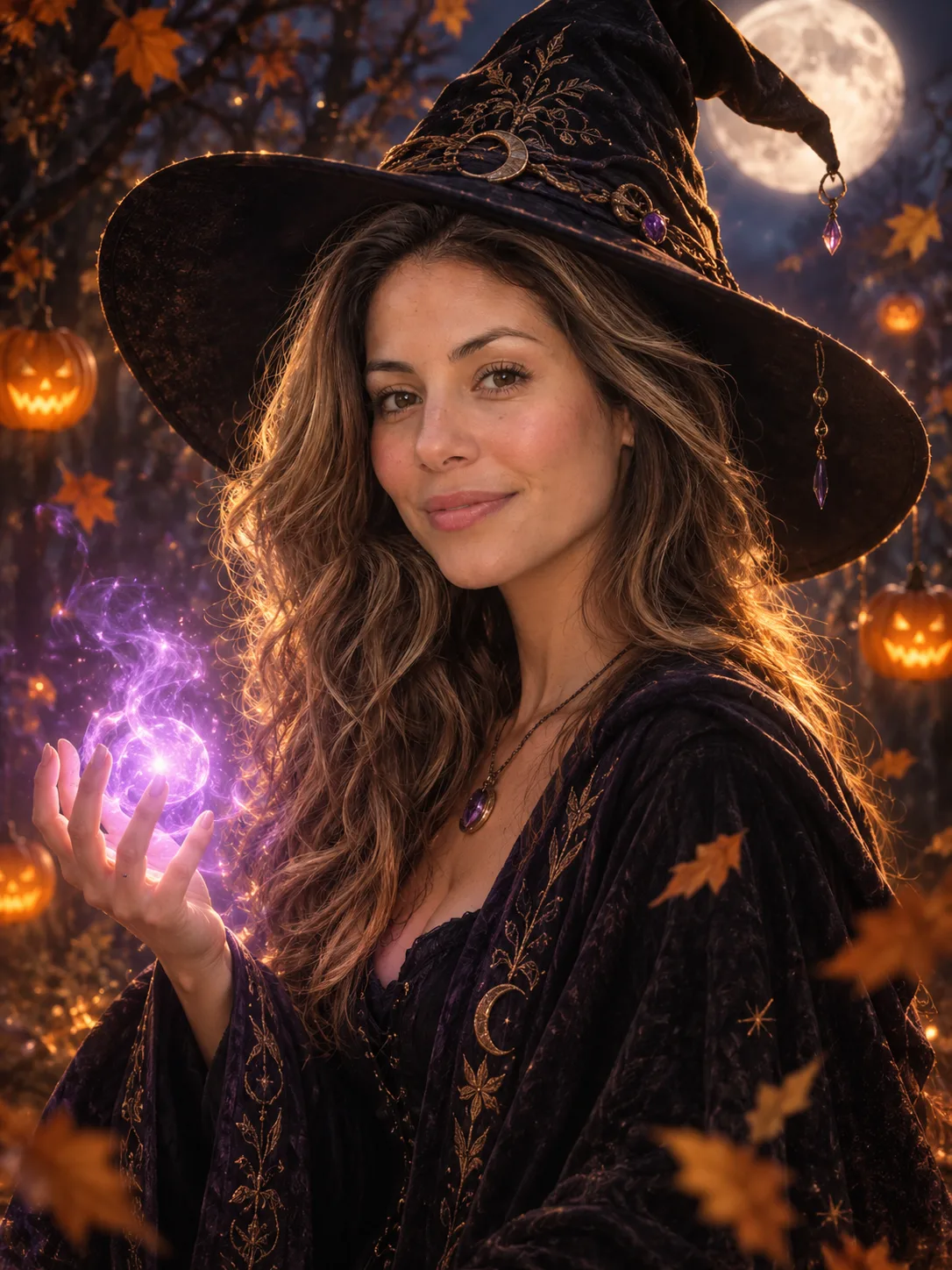
Input selfie and the result of the witch prompt above. Her face, hair and skin tone carry over; the hat, robes, spell and forest come from the prompt.
Every photo prompt below uses the same order. To save space, they use a shorter keep line: "Keep their face, features, skin tone and hair exactly as in the photo." If a result drifts away from your face, swap in the longer version from the witch prompt.
Halloween AI costume prompts for your selfie
Upload one clear photo of yourself with your face toward the camera, then paste a prompt. A 3:4 or 2:3 portrait ratio suits profile pictures and posts.
1. Magical witch
Use the witch prompt above as it is.
2. Gothic vampire
This is the prompt behind the vampire effect on this site, unchanged. The phrase "classy and atmospheric, not gory" keeps the look elegant instead of bloody.
Turn the person in the photo into an elegant gothic vampire for Halloween. Keep the person's face, facial features, skin tone, hairstyle and hair colour clearly recognisable as the same person in the photo. Pale porcelain skin, subtle crimson eyes, small fangs visible in a slight smile, dark velvet high-collared cloak over Victorian clothing. Moody candle-lit castle interior, deep reds and blacks, soft fog, cinematic low-key lighting. Classy and atmospheric, not gory. One subject only; no text unless asked for, no logos, no watermark, no extra people, no extra fingers or distorted hands.

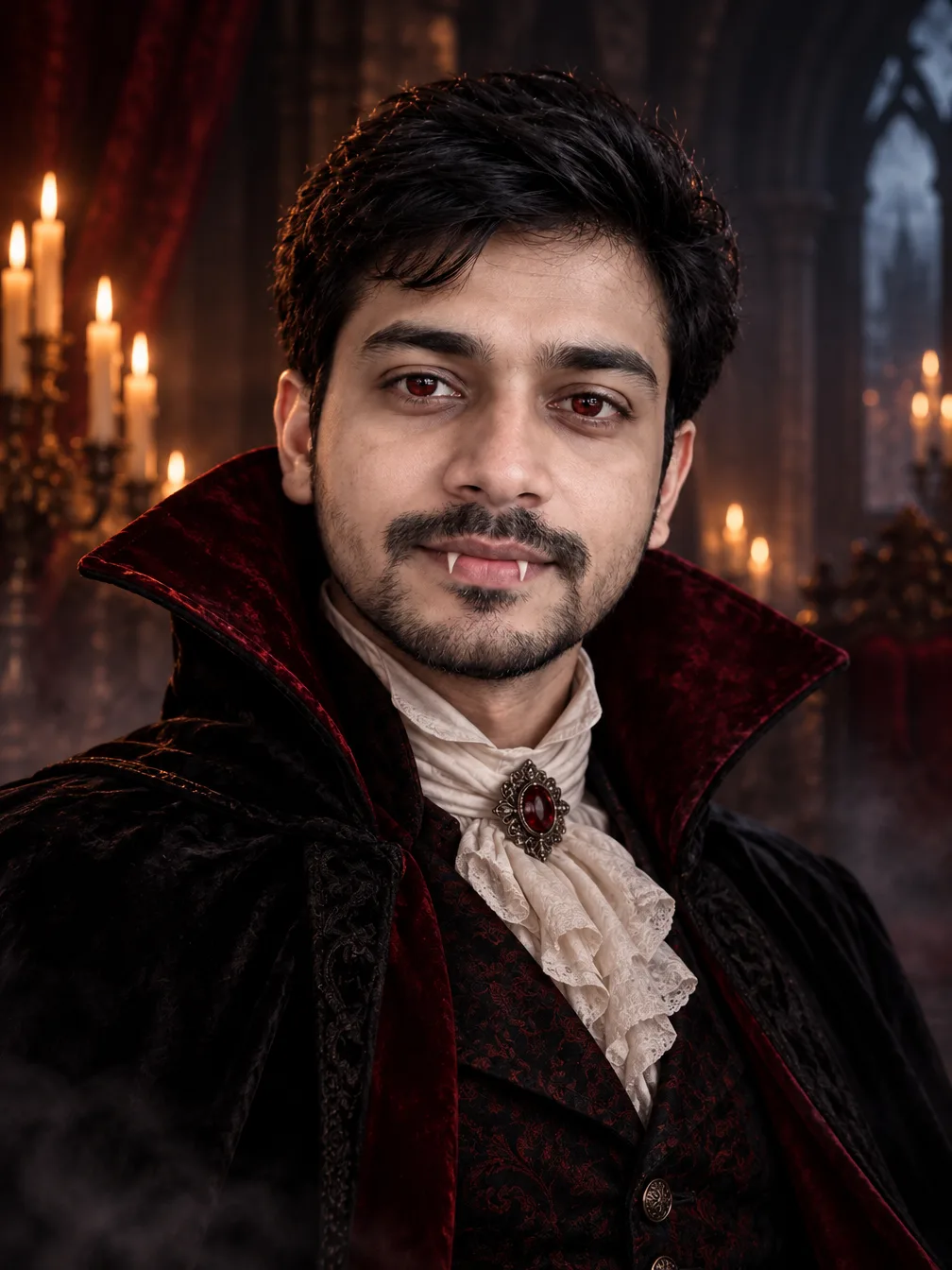
Input selfie and the result of the vampire prompt. The beard, hair and face shape stay; the skin turns slightly paler and the eyes take on a reddish tint, as the prompt asks.
3. Ghostface Polaroid (the Scream trend)
The Ghostface trend puts the masked killer from the Scream films right behind you in a late-90s horror still. This prompt is one of the three scenes in the Ghostface effect on this site, shortened slightly; the image below came from the effect's full prompt.
Turn this photo into a still from a late-1990s horror movie. Keep the person's face, facial features, skin tone, hairstyle and hair colour clearly recognisable as the same person in the photo; do not retouch or reshape the face. An instant Polaroid photo with a white border, shot with harsh on-camera flash in a dark room against a plain white curtain. The person looks into the camera, startled; right behind their shoulder Ghostface leans in close, one gloved hand resting playfully on their shoulder. Ghostface wears a black hooded robe with flowing sleeves, black gloves and the white elongated screaming ghost mask with tall hollow black eyes and a long open mouth. Casual 1990s clothes, grainy 35mm film look, Y2K colours, moody low light. Eerie but playful. Only the person and the masked figure; no text, no logos, no watermark, no blood, no weapons, no extra fingers or distorted hands.
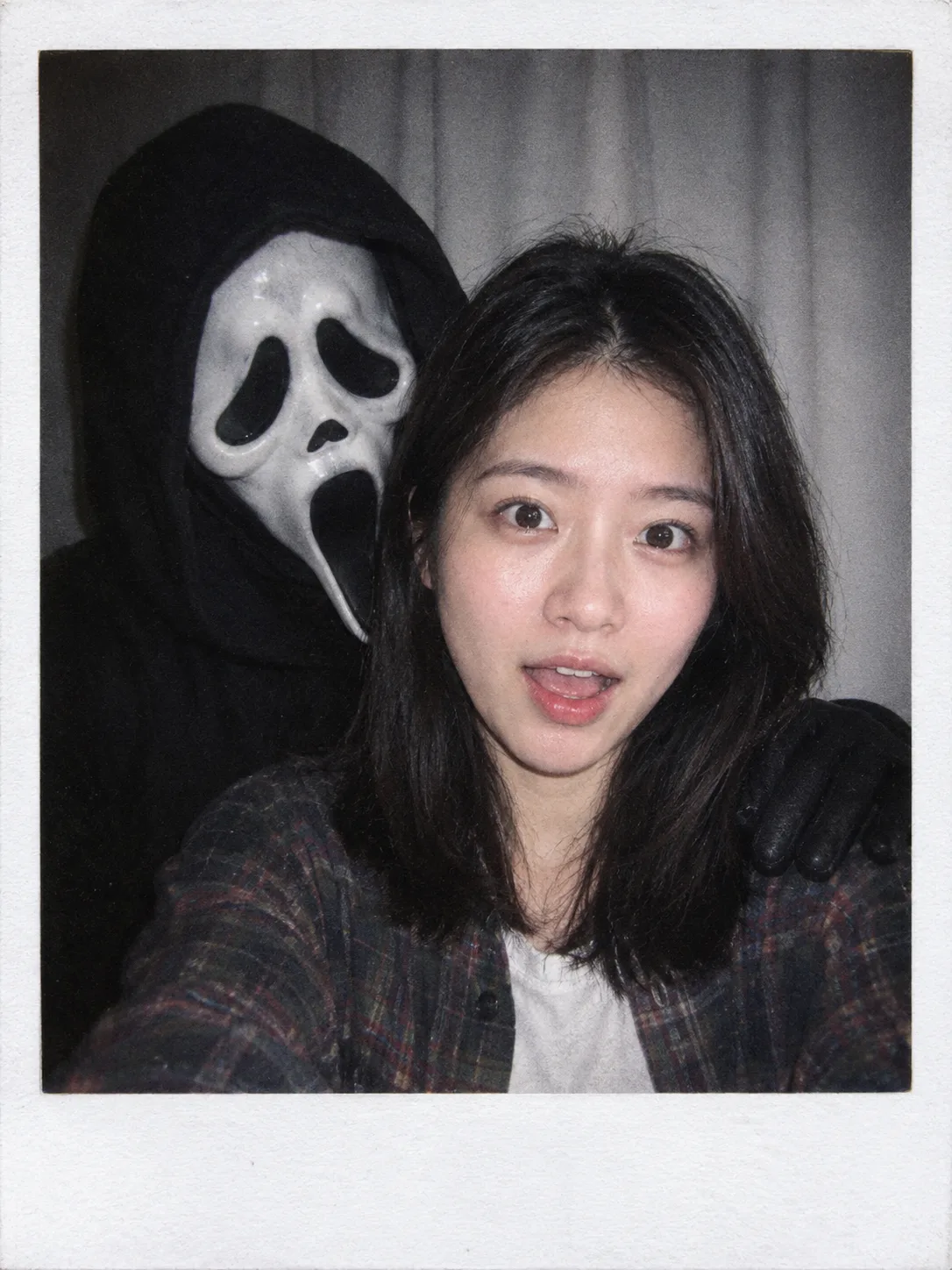
The Polaroid scene from the Ghostface effect's full prompt, run on a plain selfie. "No blood, no weapons" keeps it eerie rather than violent.
For the classic version, replace the Polaroid sentence with: "The person lies on a satin bed in a 1990s teenage bedroom at night, holding a corded landline phone, a bowl of popcorn on the bed. Behind them, in the dark hallway doorway, Ghostface stands half in shadow, watching."
4. Zombie, spooky but not gross
Turn the person in this photo into a movie-style zombie for Halloween. Keep their face, features and hair exactly as in the photo, so friends can still tell who it is; only the skin colour changes. Pale grey-green skin, dark circles under the eyes, a few small scratches, torn and dusty everyday clothes. Foggy abandoned street at night, flickering streetlight, cold blue moonlight. Spooky, cinematic, not gory: no open wounds, no blood. One person only, no text, no watermark.
5. Skeleton face paint
Keep the person's face, features, skin tone and hair exactly as in the photo, and add detailed skeleton face paint for Halloween: white base on the cheeks and forehead, black around the eyes and nose, painted teeth over the lips. Black hoodie with a skeleton print. Dark studio background with an orange rim light. Sharp, high-contrast portrait. One person only, no text, no watermark.
6. Werewolf halfway through the change
Turn the person in this photo into a werewolf in the middle of transforming. Keep their face, eye colour, skin tone and hairstyle recognisable as the same person. Thick fur growing along the jaw and ears, slightly pointed ears, amber glowing eyes, torn flannel shirt. Misty pine forest under a huge full moon. Dramatic moonlit lighting, cinematic. One person only, no text, no watermark.
7. Victorian ghost
Turn the person in this photo into a Victorian ghost. Keep their face, features and hairstyle recognisable as the same person. Translucent pale skin with a soft blue glow, a high-necked white lace dress or suit faded with age, faint wisps of mist around the shoulders. Dim hallway of an old mansion lit by a single candle, dusty portraits on the walls. Eerie, quiet and elegant. One person only, no text, no watermark.
8. Scarecrow in a cornfield
Turn the person in this photo into a friendly Halloween scarecrow. Keep their face, features, skin tone and hair exactly as in the photo. Straw poking out from the collar and cuffs, a patched plaid shirt, denim overalls, a worn straw hat, a few painted freckles. Golden cornfield at sunset with crows on a fence and carved pumpkins on hay bales. Warm, rustic autumn light. One person only, no text, no watermark.
9. Dark fairy
Turn the person in this photo into a dark fairy for Halloween. Keep their face, features, skin tone and hair colour exactly as in the photo. Large translucent black wings with violet veins, a crown of thorns and dried roses, a dark green velvet dress or tunic. Enchanted forest at night with glowing mushrooms and fireflies. Magical, moody and beautiful. One person only, no text, no watermark.
10. Retro horror movie poster starring you
Turn this photo into a 1980s horror movie poster with the person as the star. Keep their face, features, skin tone and hair exactly as in the photo. The person looks over their shoulder in fear; behind them a dark old house on a hill with one lit window, under a red sky. Painted poster style, film grain, dramatic lighting. Leave the top third dark and empty for a title. No text, no logos, no watermark.
If you want a title on the poster, add it in quotes: Title text at the top: "THE NIGHT SHIFT". Short titles render more reliably than long ones.
11. Cosy witch aesthetic
For the soft, pretty side of Halloween rather than the scary side:
Keep the person's face, features, skin tone and hair exactly as in the photo. They sit by a rainy window in a cosy cottage, wearing an oversized knitted cardigan and a small black witch hat, holding a mug of hot cider. Candles, stacked old books, dried herbs hanging from a beam, a black cat curled up on the windowsill, small pumpkins. Soft warm light, film photo look, autumn colours. One person only, no text, no watermark.
12. Funny: the tired pumpkin-head commuter
Keep the person's body, clothes and pose exactly as in the photo, but replace their head with a carved jack-o'-lantern with a tired, grumpy face and a soft glow inside. Put them on a crowded morning subway train, holding a coffee cup and looking at their phone, while other passengers ignore them. Realistic photo, natural light, deadpan and funny. No text, no watermark.
This one deliberately does not keep your face, so it works best on a photo where your outfit and pose are recognisable.
13. Funny: handing out candy to tiny monsters
Keep the person's face, features, skin tone and hair exactly as in the photo. They stand in their front doorway on Halloween night holding a huge bowl of candy, looking nervous, while a crowd of small cute monsters in trick-or-treat bags looks up at them: a tiny vampire, a little mummy, a fluffy werewolf pup. Porch lights, carved pumpkins on the steps. Bright, playful, Pixar-like lighting. No text, no watermark.
Halloween AI prompts for couples, friends and pets
For two or more people, upload one photo with everyone in it and name the costume for each person by their position. The model has no way of knowing who "Sam" is, but it can see who is on the left.
14. Vampire couple
Turn both people in this photo into a gothic vampire couple. Keep each person's face, features and hair exactly as in the photo; only the skin turns a little paler. The person on the left wears a black velvet high-collared cloak; the person on the right wears a deep red Victorian gown or waistcoat. Pale skin, subtle crimson eyes, small fangs in slight smiles. They stand close together on a stone balcony of a castle at night, candles behind them, full moon. Classy and atmospheric, not gory. Only these two people, no text, no watermark.
15. Friends as a classic monster squad
Keep every person in this photo recognisable: same faces, features, skin tones and hair. Dress them as a classic monster squad, from left to right: a vampire, a mummy wrapped in bandages with the face uncovered, a witch and a werewolf with fur on the jaw. Keep their poses and positions from the photo. Group shot in front of a haunted house with glowing pumpkins on the steps. Fun, cinematic, slightly spooky. Only the people in the photo, no text, no watermark.
16. Your dog or cat in a costume
Keep the pet in this photo exactly the same: same breed, fur colour, markings and face. Dress it in a tiny Halloween costume: a little black cape with a high red collar, like a small vampire. Sitting on a porch step next to a carved pumpkin and a bowl of candy, warm porch light, autumn leaves. Cute and funny, sharp detail on the fur. No people, no text, no watermark.
Swap the cape for a pumpkin suit, a witch hat or bat wings. The breed, fur and markings line is what keeps it looking like your pet.
Spooky Halloween AI prompts with no photo
These are text-to-image prompts: paste them into the generator without uploading anything.
17. Haunted Victorian house
A haunted Victorian mansion on a hill at night, broken shutters, one candle-lit window on the top floor, bare twisted trees, a crooked iron gate, fog rolling across overgrown grass, a full moon behind thin clouds. Dark, cinematic, highly detailed, blue and amber light. No people, no text.
18. Jack-o'-lantern still life
Close-up still life of three carved jack-o'-lanterns on an old wooden table, each with a different face: happy, scary and surprised. Candlelight glowing from inside, wax drips, dried leaves, a few small gourds, dark background with soft bokeh. Warm, moody food-photography lighting. No text.
19. Witch's apothecary
Interior of a witch's apothecary shop: crowded wooden shelves of glass bottles with glowing potions, jars of herbs and mushrooms, an open spell book on the counter, a bubbling cauldron, a black cat sitting among the bottles. Warm candlelight with green and purple glows. Rich detail, cosy and magical. No people, no readable text on labels.
20. Vintage Halloween postcard
A vintage 1920s Halloween postcard illustration: a smiling black cat on a crescent moon, bats, a jack-o'-lantern and a witch flying on a broom in the distance. Muted orange, black and cream colours, printed paper texture with slight wear on the edges. Charming and old-fashioned. No text.
21. Halloween party invitation
A Halloween party invitation card, portrait layout. Dark purple background, a border of small bats and orange pumpkins, a glowing moon at the top. Large title text: "HALLOWEEN PARTY". Below it, smaller text: "Saturday, Oct 31 · 8 PM". Elegant spooky style, clean layout with readable lettering, plenty of space around the text.
Put every word you want on the card in quotes and keep it short. For readable lettering, GPT Image 2 is the model this site recommends for text inside images. Check the spelling in the result before you send it.
22. Cute ghost sticker sheet
A sticker sheet of eight cute kawaii Halloween characters on a plain white background: a smiling ghost, a sleepy bat, a pumpkin with blushing cheeks, a tiny witch hat, a candy corn, a black cat, a mummy, a cauldron. Thick white sticker borders, flat colours, soft shading, evenly spaced. No text.
23. Classic horror movie poster
A 1970s horror movie poster painting: a lonely farmhouse at the end of a long dirt road, a dark figure in a field of tall corn, a blood-red sunset sky, crows overhead. Painted illustration style, film grain and faded print colours. Leave space at the bottom for a title. No text, no logos.
24. Halloween phone wallpaper
A Halloween phone wallpaper, vertical 9:16. A quiet street of old houses at dusk with carved pumpkins glowing on every porch, autumn leaves on the pavement, a purple and orange sky, a few bats in the distance. Leave the top third simple and dark for the clock. Soft, cosy and slightly spooky, detailed. No people, no text.
Set the aspect ratio to 9:16 in the generator as well as in the prompt.
25. Spooky aesthetic flat lay
Top-down flat lay on a dark slate surface: a small pumpkin, dried roses, a brass key, tarot-style cards with plain backs, a black candle, scattered candy corn, a lace doily, autumn leaves. Moody, soft window light, muted orange and black tones, aesthetic Instagram style. No people, no text.
Where to run these Halloween AI prompts
On this site:
- Photo prompts (1 to 16): open image to image, upload your photo, paste the prompt and pick a model. GPT Image 2.5 Flare is a good default: it is the model the witch, vampire and Ghostface examples above came from, and it is the one this site recommends for keeping one character the same.
- No-photo prompts (17 to 25): paste them into the generator on the homepage without uploading anything. Use GPT Image 2 for the party invite or anything else with words in the image.
- Aspect ratio: pick it in the generator. 3:4 or 2:3 for portraits, 9:16 for a phone wallpaper or a story, 1:1 for a sticker sheet. The ratios on offer depend on the model.
You can also send the same prompt to a second model and compare the two results before you choose one.
New accounts get 10 free credits. The price of each image depends on the model and resolution, and it shows on the Generate button before you start. Free images come out at each model's lowest resolution with a watermark, for personal use. Any plan or credit pack removes the watermark and unlocks higher resolutions.
If you would rather not write a prompt
The witch, vampire and Ghostface prompts are built into one-click effects: you upload a photo and nothing else.
- AI Halloween costume: the witch, plus more costumes
- AI vampire filter: the gothic vampire portrait
- Ghostface AI: the bedroom phone call, the Polaroid or the mirror selfie, with an optional short wish such as "a red hoodie"
- Halloween transformation clip: a short video of you turning into a vampire
Each image effect costs 10 credits, so the free credits from a new account cover one try. The video clip costs more.
When the Halloween AI result doesn't look like you
The face changed. Use the long keep line from the witch prompt and put it right after the first sentence. Upload a sharper photo: one person, face toward the camera, good light, no sunglasses. Group photos and side angles give the model less of your face to work with.
Your hair or skin tone changed. Name them in the keep line. A costume word can pull them along (a "pale vampire" changes skin on purpose), so say which change you want and which you don't.
Extra people or a second Ghostface appeared. End with "one person only" or "only the person and the masked figure", as the prompts above do.
It looks too gory or too cartoonish. Say the tone directly: "spooky but not gory", "classy and atmospheric", or "realistic photo" or "cute and playful".
Text came out misspelled. Use fewer words, put them in quotes, and try GPT Image 2.
Everything is close, but one detail is wrong. Keep the prompt and change only that detail. Rewriting the whole prompt usually changes the parts you liked as well.
Halloween AI prompts FAQ
How do I do the Halloween AI trend?
Upload a clear selfie to an image-to-image tool, paste a Halloween prompt such as the witch, vampire or Ghostface prompt above, and generate. The trend images have the same three ingredients: your own face, a costume and a cinematic setting. If you don't want to write a prompt, the one-click effects above do the same thing from just a photo.
Are these Halloween AI prompts free?
Yes, all 25 are free to copy and change. Generating an image costs credits on this site; new accounts get 10 free credits. That is about three images on GPT Image 2.5 Flare at its lowest resolution, enough to try a few prompts before you pay anything.
Can I use these prompts in ChatGPT or Gemini?
Yes. They are plain English descriptions with no site-specific codes. Results differ between models, so you may need to adjust a detail or two, but the structure (the change, the keep line, the costume, the setting, the leave-outs) carries over, and the keep line matters in every tool.
What are good AI prompts for horror?
Name a film era and a camera look ("late-1990s horror movie still, grainy 35mm film"), describe one threatening detail rather than many (a figure in a doorway, a single lit window), and set the light low. Prompts 3, 10, 17 and 23 are good starting points.
Happy Halloween, and post the one that still looks most like you.