


限时 6 折优惠!领取优惠

多模型 AI 图片生成器 先对比,再挑

一句提示词跑遍 gpt-image-2、Nano Banana、Seedream —— 看每个结果,留最好那张。

AI Image Studio 是一个为对比而生的多模型 AI 图片生成器。写一句提示词,跑遍每个顶级模型,把输出并排评判,而不是把一个任务押在单一生成器上。无需切标签页、无需多份订阅。注册即送免费积分,付费档附商用授权。

  • 一句提示词,跑遍每个顶级模型
  • 下手之前先对比输出
  • 所有模型共用一个积分池
  • 付费档附商用授权
先对比,再挑
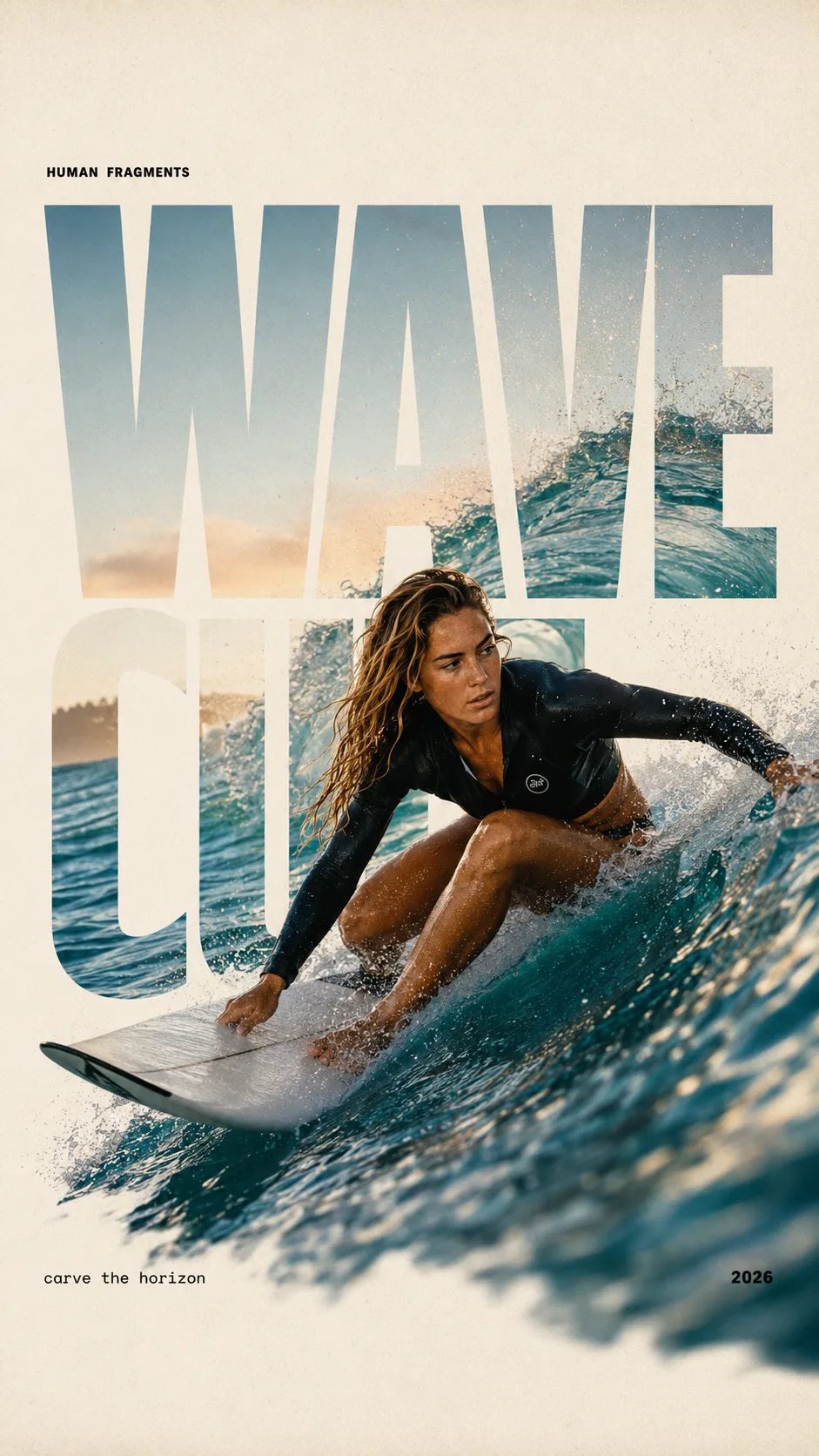
HUMAN FRAGMENTS editorial poster sample

Create a 9:16 editorial poster in the HUMAN FRAGMENTS visual system. Theme: [surfing / basketball / boxing / cake decorating] Subject: [gender, age, appearance, outfit] Action: [specific movement or handcraft] Scene: [location and environment] Title: [custom two-word title] Supporting line: [one short phrase] Year: 2026 Use oversized cropped typography as the main structural framework. The letters should act as windows that reveal the surrounding environment, while the main person remains visually complete in front of the type. Do not let the letters cut through the face, torso, arms, thighs, or other important parts of the body. Let one key action element break beyond the typography to create strong depth: 1. WAVE CUT — a surfer carving across a rising wave, with the board nose, hand, water spray, and curled wave breaking outside the letters. 2. RIM RISE — a basketball player reaching toward the hoop from a camera placed above the rim, with the basketball, hand, and hoop fully outside the letter masks and aligned naturally. 3. IMPACT FRAME — a boxer throwing a straight punch toward the camera, with the foreground glove enlarged and breaking beyond the typography while the gym remains inside the letters. 4. SOFT SWIRL — a graceful young woman decorating a cake, with the piping bag, hands, cake, and cream details extending beyond the letters while the bakery interior appears inside the type. Use realistic photography, believable anatomy, natural skin texture, strong foreground perspective, subtle paper grain, a warm off-white background, restrained colors, and clean editorial spacing. Keep the text minimal and freely placed: [Title] HUMAN FRAGMENTS [Short supporting line] 2026

Create a 9:16 editorial poster in the HUMAN FRAGMENTS visual system. Theme: [surfing / basketball / boxing / cake decorating] Subject: [gender, age, appearance, outfit] Action: [specific movement or handcraft] Scene: [location and environment] Title: [custom two-word title] Supporting line: [one short phrase] Year: 2026 Use oversized cropped typography as the main structural framework. The letters should act as windows that reveal the surrounding environment, while the main person remains visually complete in front of the type. Do not let the letters cut through the face, torso, arms, thighs, or other important parts of the body. Let one key action element break beyond the typography to create strong depth: 1. WAVE CUT — a surfer carving across a rising wave, with the board nose, hand, water spray, and curled wave breaking outside the letters. 2. RIM RISE — a basketball player reaching toward the hoop from a camera placed above the rim, with the basketball, hand, and hoop fully outside the letter masks and aligned naturally. 3. IMPACT FRAME — a boxer throwing a straight punch toward the camera, with the foreground glove enlarged and breaking beyond the typography while the gym remains inside the letters. 4. SOFT SWIRL — a graceful young woman decorating a cake, with the piping bag, hands, cake, and cream details extending beyond the letters while the bakery interior appears inside the type. Use realistic photography, believable anatomy, natural skin texture, strong foreground perspective, subtle paper grain, a warm off-white background, restrained colors, and clean editorial spacing. Keep the text minimal and freely placed: [Title] HUMAN FRAGMENTS [Short supporting line] 2026
单一生成器会让你错过最好的那张

每个图像模型都有不同的强项和盲点。gpt-image-2 能把别的模型糊掉的图内文字渲染清楚。Nano Banana Pro 写实皮肤和光影最稳。Seedream 偏风格化;Grok Imagine 出草稿快。押在一个模型上,就等于在每个任务上接受它的弱点。多模型 AI 图片生成器反过来做:AI Image Studio 把你的提示词跑遍所有模型,提示词和参考图保持加载,让你在为错的那张花掉一次下载之前,先对比真实输出。

怎么用

三步对比模型

从一句提示词到最好的输出 —— 无需重打、无需重传、无需按模型付费。

  1. 1

    提示词只写一次

    输入你的需求,或拖入参考图做图生图。无论跑多少个模型,提示词和参考图都保持加载 —— 你只写一次,不是每个生成器写一遍。

  2. 2

    让它跑遍模型

    在下拉里挑 gpt-image-2、再挑 Nano Banana、再挑 Seedream —— 每个都跑同一句提示词。多模型 AI 图片生成器把每个输出都留在运行历史里,对比就摆在眼前。

  3. 3

    挑出赢家、下载

    把输出并排评判,下载最合适的那张。失败的运行自动退积分,所以多试几个模型即使没中也不花钱。付费档附商用授权。

谁在用多模型 AI 图片生成器

对比就是工作流 —— AI Image Studio 让每个人在同一个需求上海选模型,不离开页面。

  • 设计师

    设计师把一句概念提示词跑遍三个模型,挑出构图最强的那张再精修。多模型 AI 图片生成器把「哪个工具最贴这个需求」从三个账号的实验,变成一句提示词和一次并排对比。

  • 工作室与代理商

    代理商统一用一个工作台,而不是为四个付费。整个团队把客户提示词跑遍模型、对比、从一个积分池结算 —— 没有按席位、按模型的订阅蔓延。

  • 印刷与包装

    包装活儿需要干净的图内文字,所以工作室靠 gpt-image-2 —— 但在同一句提示词上海选 Nano Banana 出写实主视觉。一个多模型 AI 图片生成器两边都覆盖,无需切站。

  • 独立开发者

    单干的创始人从一个工作台出 app 美术、营销视觉和商店素材。让提示词跑遍模型意味着赢的是最好的结果,而不是他们恰好订阅的那个模型。

包含什么

一个多模型 AI 图片生成器该有的全都有

  • 每个顶级模型同一个选择器

    gpt-image-2、Nano Banana Pro、Seedream、Grok Imagine 等同在一个多模型 AI 图片生成器选择器里 —— 随厂商发新版本更新,绝不是过期快照。

  • 为对比而生的运行历史

    一句提示词在每个模型的输出都落进同一个运行历史。并排对比、改参数重跑、留下赢家 —— 多模型工作流是默认,不是事后补丁。

  • 跨模型图生图

    每个支持图生图的模型都接受你的参考图。改风格、换背景、扩展画面,再把同一个编辑跨模型海选,无需重传。

  • 所有模型共用一个积分池

    注册送免费积分,每日签到可补。多模型 AI 图片生成器里任意模型都能花 —— 没有锁定模型的余额,没有隐藏档位。

  • 付费档附商用授权

    每个模型的输出,付费档都附商用权利。具体条款见法律页。

  • 失败任务自动退积分

    服务器报错、模型超时、内容过滤 —— 任何运行失败都自动退还积分。多试一个模型没中也不花钱。

关于多模型 AI 图片生成器的常见问题

这个多模型 AI 图片生成器免费吗?

免费 —— 新账号注册即送免费积分,可花在工作台里任意模型上。免费积分通过每日签到和邀请补充;当你需要更多额度或商用授权输出时,再考虑付费档。

能让同一句提示词跑遍多个模型吗?

能 —— 这正是重点。提示词只写一次,再在下拉里切换模型,让它跑遍 gpt-image-2、Nano Banana、Seedream 等。提示词和参考图保持加载,每个输出都落进运行历史,方便并排对比。

这和分别上每个模型自己的站有什么不同?

上每个模型自己的站意味着各开一个账号、各付一份订阅、每次重打提示词。多模型 AI 图片生成器给你一个登录、一个积分池、一个运行历史 —— 对比模型是一次下拉切换,不是四个浏览器标签页。

该挑哪个模型?

让提示词跑遍几个,由输出决定。起点参考:gpt-image-2 适合图内文字和包装,Nano Banana Pro 适合写实人像,Grok Imagine 出风格化草稿快。选择器里带标记和说明,不离开工作台就能挑。

生成器能编辑已有的图吗?

能 —— 多数模型支持图生图编辑。上传参考图、描述要改的地方,生成器在物体层面修改,画面其余部分保持不变。参考图跨模型保留,所以你可以把同一个编辑在多个模型上海选。

输出能商用吗?

能 —— 每个模型的输出,付费档都附商用授权,具体条款见法律页。

打开多模型 AI 图片生成器

注册送免费积分,一句提示词跑遍每个顶级模型,付费档输出可商用。